YouTube replay to Shorts clip maker
Cut a YouTube replay into a vertical Short. Use a licensed rally recording to match the source timestamp, choose a portrait crop and credit the export.
See your scan cost before you start. Have a recording? Upload your file.
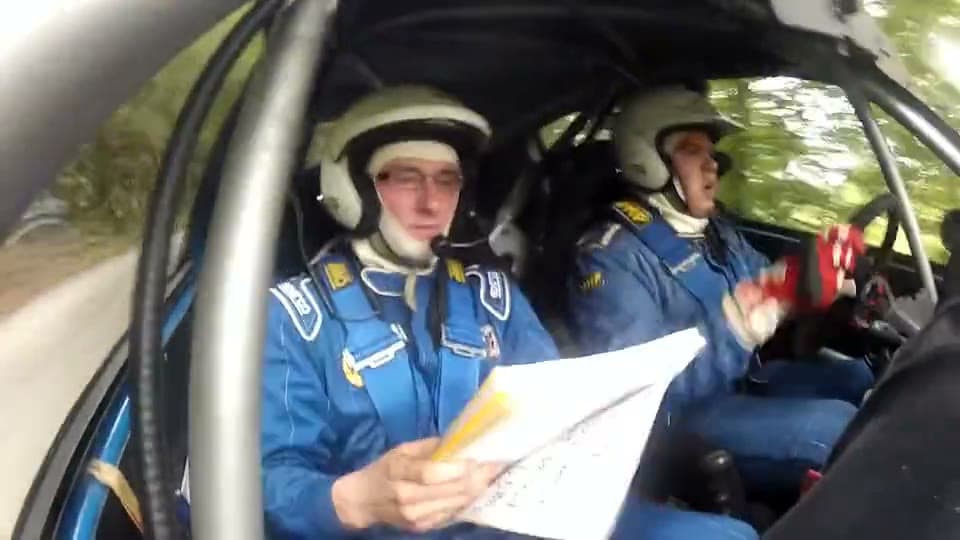
A page turn in a rally car
The source is 54 seconds of onboard footage from Multimedijski Krožek. In the 12-second portrait cut, the co-driver looks down at his notes and then up at the road.
Watch the vertical rally edit Rally footage by Multimedijski Krožek. Source, license and editsStart from a single video
Open the recording you want to cut and copy its video link. A channel or playlist can contain several different recordings. Keep the original title, creator and timestamp with the edit. For this practice cut, the 54-second file begins at 5:28 in the original YouTube video.
Find the original and its footage terms →Use the camera movement to place the crop
At 0:14 in the practice file, the scan measured a change in motion. That maps to 5:42 in the original. Pause there to frame the co-driver’s hand and notes, then play through the approach to check the road ahead stays visible. A second candidate near 0:44 was picked for its sound. Play both with headphones before choosing the Short.
Compare all three rally candidates →Write the credit while you have the source open
This recording carries a Creative Commons Attribution 3.0 license. The example credit names the creator, links the original and license, and describes the portrait crop and added captions. Check the terms for each new recording. For a campaign, also check the organizer’s posting requirements before you upload the Short.
Read the credit that accompanies the rally edit →